Art Requirements
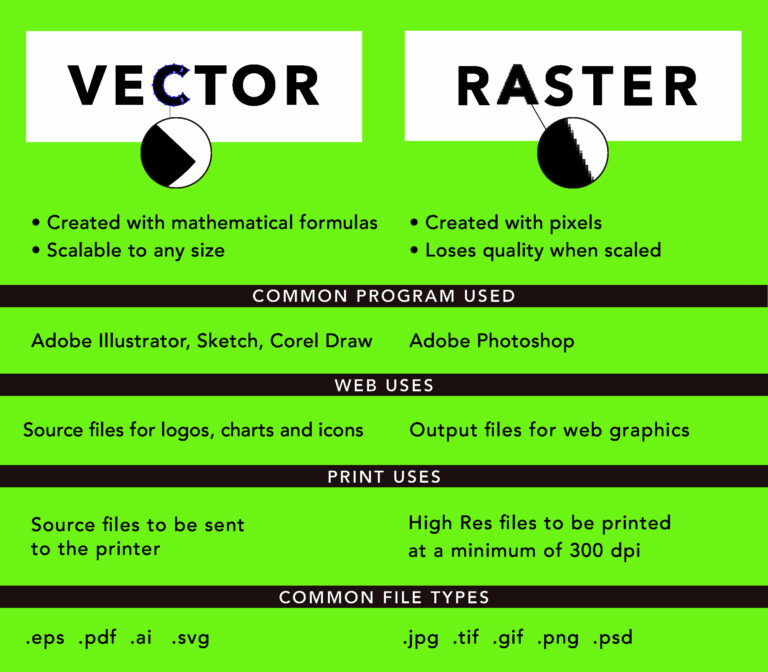
VECTOR – Illustrator – *.AI *.PDF
A vector graphic is artwork made up of points, lines, and curves that are based upon mathematical equations, rather than a solid colored square pixels. This means that no matter how large or small or how close you zoom in on the image, the lines, curves, and points remain smooth.
RASTER – Adobe Photoshop – *.PSD *.PDF
Raster artwork is any digital art composed of horizontal and vertical rows of pixels. As a result, when raster images are enlarged, the image quality diminishes significantly. Typical raster file types include .psd, .tif, .jpg, .gif, and .bmp. All Photoshop files MUST be of high quality and a minimum of 300 DPI.
* Please save your graphic as your design name to make it easier to find if we ever need reprints. *
LOW RESOLUTION RASTER FILES are NOT acceptable file formats.
Psycho Squeegee Print Co. wants the highest quality product and unfortunately these types of files do not fit the minimum requirements.
PROCREATE ARTWORK
If you’re creating artwork via Procreate;
If you have created artwork in the Procreate app on an iPad and you want to edit it in Adobe Illustrator on your computer, you will need to export it as a file that can be opened in Illustrator. Here are the steps to do this:
- Open your artwork in Procreate and tap the “Share” button in the top-right corner of the screen.
- In the Share menu, tap “Export” and then select “SVG” as the file format. This will export your artwork as a scalable vector graphic file, which can be opened and edited in Illustrator.
- Tap “Next” and then choose a name for the exported file. * Please save your graphic as your design name to make it easier to find if we ever need reprints. *
- Tap “Export” and save the .svg file to a location where you can access it on your computer.
- Once you have exported your artwork as an .svg file, you can then open it in Illustrator by going to File > Open and selecting the file.
- In Illustrator, you can then edit your artwork as needed. Be sure to save your changes to the .ai file when you are finished.
TO ENSURE THE FASTEST TURNAROUND
- Send your artwork in the correct format.
- Make sure your resolution is at least 300 dpi.
- If you have font in the graphic, please make sure the font is also vectorized.
- If your graphic will be inverted, it’s best to have your artist add a stroke instead of inverting the image.
If our designer finds your graphic to be unprepared for printing, there will be a design fee of $65 per design/per hour & the turnaround time will be extended.
If there have been slight changes to old artwork, there will be a separation fee of $80/design.